

This article will provide an explanation of Local AI Agents and analyze their functionalities, core advantages, and growing prominence as a substitute for cloud-based AI solutions.
I will demonstrate that because local AI agents operate directly on your device, they provide superior privacy, the ability to work offline, and faster responses. Local AI Agents will transform everyday and corporate use of artificial intelligence.
What Are Local AI Agents?
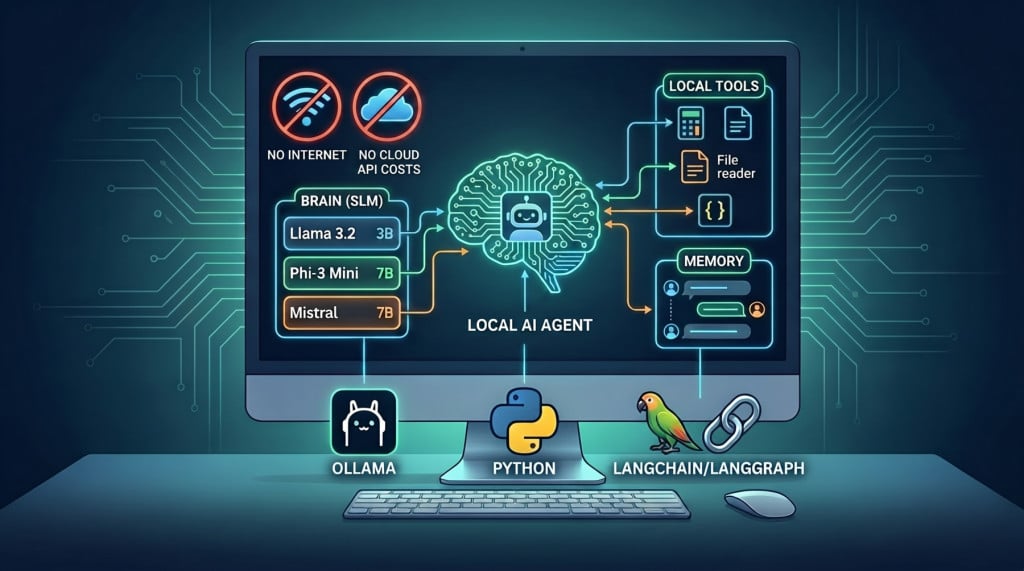
Local AI agents are AI systems that function on a user’s device. Unlike traditional systems that use cloud servers, local AI agents use AI models that are installed on a local device to analyze data and generate responses. Because of this, local AI agents function with user data more securely.
This leads to locality, privacy, and security of the data. These systems can also be used in offline environments. Local AI agents use system hardware in order to perform functions such as generation of text, coding, responding to queries, etc.
These systems can be used in edges devices and within environments that are focused on security and privacy. Compared to traditional AI systems, local AI agents utilize user hardware directly to create a more efficient and secure environment for the user of the AI agent.
How to Set Up a Local AI Agent (Basic Overview)
Step 1: Find an Offline AI Tool
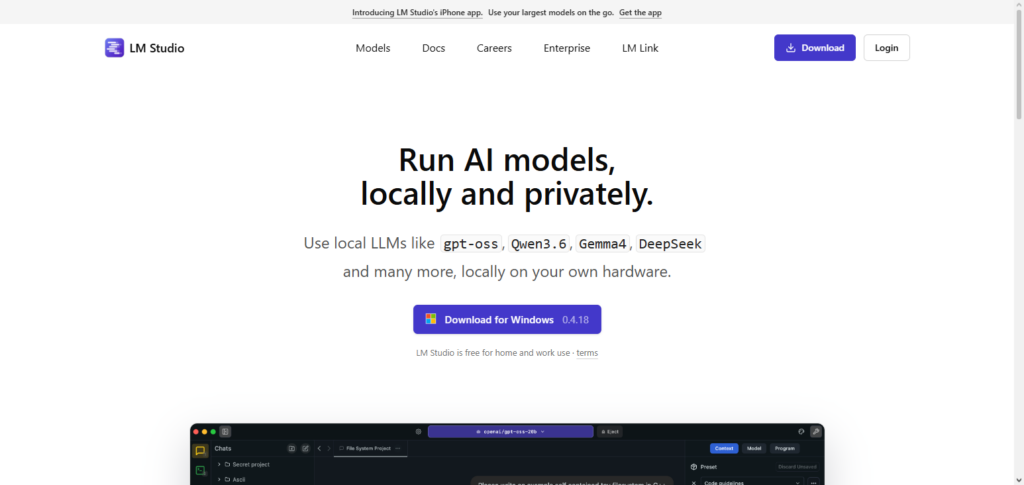
Pick one software solution to use. Try Ollama, LM Studio, or GPT4All. These programs let users run AI models on personal computers.
Step 2: Check Available System Resources
Confirm you have enough system resources available. You should have a minimum of 8-16 GB RAM, a modern CPU. You can also have a GPU, which will help the program run faster.
Step 3: Install the Program
Go to the official websites of the software you chose and download the application. Go through the set up process for your OS (Windows, macOS, or Linux).
Step 4: Get Your AI Model
Go to the software you installed. Choose a local language model to download. The models available will run offline on your computer.
Step 5: Start Your Local AI Agent
Open the model in the application. After the model is loaded, you can start giving it command and chatting with it. You can do this completely offline.
Step 6: Set the Preferences
You can change where the AI program will respond (this is often called the response length), how random the responses will be (this is called Temperature), and other preferences to get a better quality response faster.
Step 7: Try it Out
Test the AI program with normal prompts to see if it can write text, respond to questions, or help with coding.
Step 8: Go Wild
Use plug ins and tools and change prompts to get your Local AI Agent to a level of personalization and power that you want.
How Local AI Agents Work
User Prompts Local AI Assistant: Users can text, command, or query the local AI assistant.
Loading AI Model into Devices: Certain pre-trained AI models are loaded and made accessible to devices (via LLaMA or Mistral).
AI Model Computation: Data is computed with the AI model using the device’s GPU/CPU, without the need to relay information to external servers.
Tokens: Input is segmented into tokens, and the AI predicts requisite words on a step-by-step basis.
Responses: Tokens are compiled into a response.
Local Processing: All computation is conducted on the device.
Response is Outputted: The local AI application instantaneously displays the computed response.
Tuning AI Model and Computation: Some systems enable even better tuning of the response to require less memory and processing power.
Benefits of Local AI Agents
Data Privacy:
All information is stored on your device with no transmission, reducing risks of information exposure or loss.
No Internet Necessary:
Functions without being connected to the internet, making them deployable at any time or location.
Rapid Turnaround:
Because everything is processed on the device, it is much faster.
Total Control:
No reliance on service providers to control the model, data, or configuration.
Cost Effectiveness:
No need to pay for the cloud or API for performing AI operations.
Enhanced Security:
No data is sent outside the device.
Versatile Customization:
Allows for greater modification and flexibility of the model.
No Dependency on Downtime:
Performance is unaffected by service outages.
Real-World Use Cases
Personal Productivity Assistant: Aids in the management of tasks for email drafting, note summarization, and schedule organization without the internet.
Content Creation: AI tools support blogging and article writing as well as the creation of social media post captions and even inspiration for posts without the need for online tools.
Coding and Software Development: AI Agents assist in the development of software by writing code, locating and fixing bugs, and providing programming concept definitions.
Business and Enterprise Security: Locally AI Agents are used to keep sensitive data safe and not sent to external servers.
Offline Education Tools: Locally AI Agents can assist students in the tutoring and teaching by providing the answers to questions, solving problems, and creating practice problems and questions.
Healthcare Assistance (Non-Diagnostic): AI Agents assist with the management of medical notes and report summaries as well as the support of healthcare related tasks and activities done in a safe secure environment.
Edge Devices and IoT Systems: Artificial Intelligence models can be locally run on smart devices and embedded systems and robots for real-time decision making.
Research and Data Analysis: AI Agents locally assist in the analysis of data for researchers and the creation of analyses without the need for tools on the internet.
Popular Tools and Frameworks
Ollama:Easily set up and controlled via CLI to run local large language models.
LM Studio: Modern and user-friendly desktop application to download and manage local LLMs.
GPT4All: Open-source framework to run local AI models on personal computers.
llama.cpp: Resource efficient and highly optimized to run LLaMA based models on CPUs.
Hugging Face Transformers (Local Mode): Enables the user to download and run models on their local machine.
LangChain (with Local Models): Used to build AI agent workflows to automate tasks with local LLMs.
PrivateGPT: Provides fully offline AI for secure document-based Q&A.
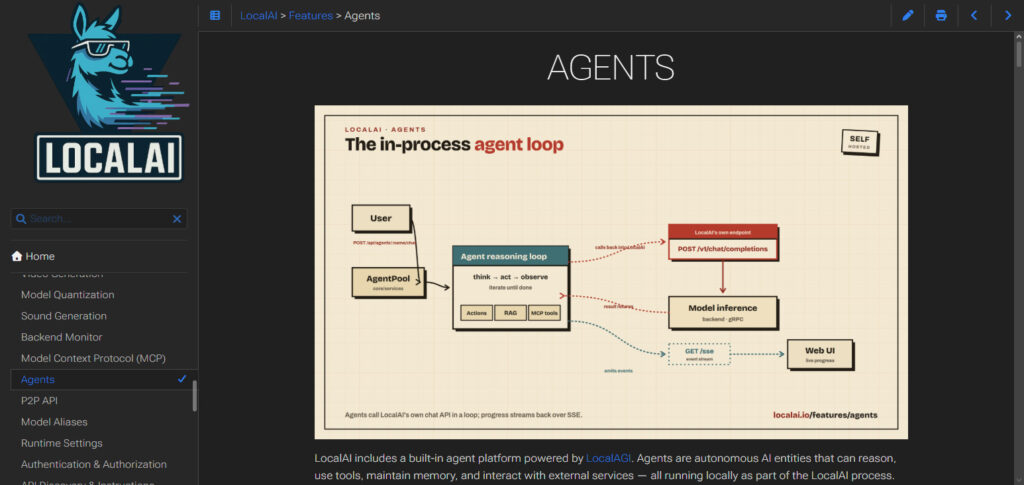
LocalAI: Open-source and provides OpenAI APIs to run models locally and avoid cloud use.
Limitations and Challenges
Intensive Hardware Demands
Local AI agents require high-end CPUs and GPUs along with a considerable amount of RAM.
Small Model Size
Smaller models tend to be less accurate, and with locally hosted AI agents, you may be forced to use models with less accuracy when compared to larger models hosted on the cloud.
Poor Performance on Older Hardware
Very old laptops, or any sort of weak hardware, may even struggle to get a response from the model.
Tedious Installation and Configuratio
For the people who do not have enough technical knowledge, the installation and configuration of the models can be cumbersome.
Large Disk Space Usag
A single AI model can consume upwards of multiple gigabytes of storage.
Highly Limited Features
Many features and capabilities such as multimodal features, advanced reasoning, and even access to current information are typically nonexistent.
Manual Model Updates
For the user to obtain the latest version, the user has to manually download updates for the model.
Self-management
The user has to undertake the optimization, configuration, and the overall management of the system.
Future of Local AI Agents
Local AI agents are likely to see considerable growth for the foreseeable future. Edge computing improves the capabilities of lightweight large language models so that users can have powerful assistants on their devices. This technology allows integration of AI into personal devices while improving privacy and autonomy from the cloud while providing real-time responses.
The future will see integrated systems combining local and cloud AI as the standard for an optimum responsiveness. The future use of open-source AI technology will include personal and business local AI systems for peace of mind.
Pros & Cons
| Aspect | Pros | Cons |
|---|---|---|
| Data Privacy | Data stays on-device, reducing exposure to cloud breaches | Limited cloud protection updates and monitoring |
| Speed & Latency | Faster response since no internet dependency | Performance depends on local hardware strength |
| Offline Access | Works without internet connection | Limited access to real-time data or updates |
| Security Control | Full control over data and model usage | User responsible for security setup and maintenance |
| Customization | Can be fine-tuned for personal or enterprise use | Requires technical expertise to configure |
| Cost Efficiency | No ongoing cloud API costs | High upfront cost for hardware setup |
| Scalability | Useful for edge devices and private systems | Hard to scale across multiple devices or teams |
| Model Updates | Stable versions can be locked for consistency | Manual updates needed; may miss latest improvements |
Conclusion
Local AI agents are more groundbreaking than the phenomena know as AI. Cloud-based systems rely on an external network. Local AI agents bring everything ‘in-house’.
Users can now run sophisticated AI assistants that don’t connect to the Internet. Local AI agents are faster because they work on-device. Local AI is more secure and can have higher customization. There is a trade-off between cloud-based and local agents because of the hardware requirements of the local AI.
Although the trade-offs exist, the usefulness of Local AI systems is greater than that of cloud-based systems. The systems are being implemented more and more and will eventually be a groundbreaking addition to private infrastructure.
FAQ
What are local AI agents?
Local AI agents are AI systems that run directly on your device instead of using cloud servers, allowing offline and private processing.
Do local AI agents need internet?
No, once installed and set up, most local AI agents can work completely offline without an internet connection.
What devices can run local AI agents?
They can run on laptops, desktops, and even some high-performance smartphones or edge devices with enough RAM and processing power.
Is it difficult to set up a local AI agent?
Basic tools like Ollama or LM Studio make setup easier, but some technical knowledge is still helpful for advanced configurations.
Are local AI agents free to use?
Many tools and open-source models are free, but some advanced models or setups may require paid hardware or resources.