



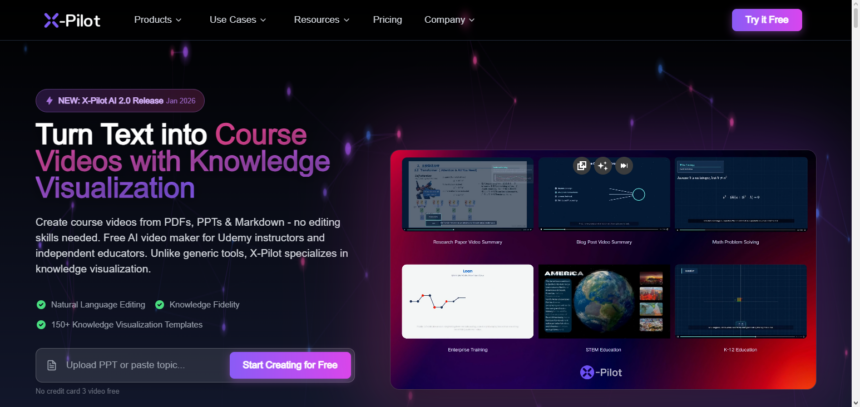
In this post, I’ll talk about X-Pilot AI, a cutting-edge AI-powered platform that turns written content, documents, and presentations into organized, eye-catching instructional videos.
X-Pilot AI facilitates the efficient, accurate, and large-scale delivery of professional learning content for educators, trainers, and creators by combining intelligent concept analysis, motion-based visual templates, and natural language editing.
What Is X-Pilot AI?
X-Pilot AI is an AI-powered video creation platform that creates structured animated educational movies and courses with graphics, voiceovers, and logic-driven motion graphics from text and educational materials, such as PDFs, PowerPoints, papers, or straightforward prompts.
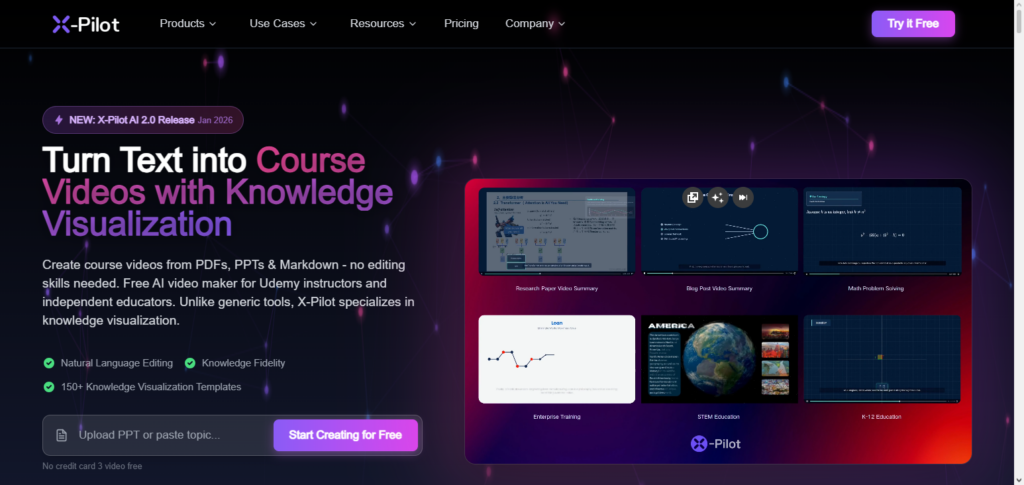
It uses a knowledge visualization engine with thousands of templates (called “Visual Motion Boxes”) to transform complicated ideas into understandable flowcharts, diagrams, and animations rather than just talking heads.
This helps businesses, educators, and course designers create expert content fast and accurately. In order to minimize AI errors and expedite content creation, X-Pilot also provides natural language editing, permits multilingual voiceovers, and prioritizes fidelity to source material.
Key Points Table
| Attribute | Details |
|---|---|
| Product Name | X‑Pilot AI |
| Founded | 2024 |
| Founder | Heshan Bian |
| Category | AI-powered Educational Video & Knowledge Visualization Platform |
| Core Technology | Uses AI to transform text, PDFs, PPTs, and documents into structured animated videos with visuals and voiceovers. Employs a “Visual Motion Box” system for logical and pedagogical animation. |
| Mission | To simplify content creation by enabling educators, course creators, and businesses to generate professional educational videos quickly and accurately without technical skills. |
| Key Features | Text-to-video conversion, natural language editing, multilingual voiceovers, motion graphics templates, zero-hallucination AI, structured learning flow. |
| Use Cases | Online courses, explainer videos, corporate training, educational content, technical documentation, knowledge visualization. |
| Headquarters | R&D in Shenzhen, China; Legal entity in Milton, Delaware, USA |
| Investors / Backing | Seed funding and startup backing to accelerate AI education tools development. |
| Impact | Enables faster content creation, improves learning comprehension, and supports creators in producing high-quality educational videos. |
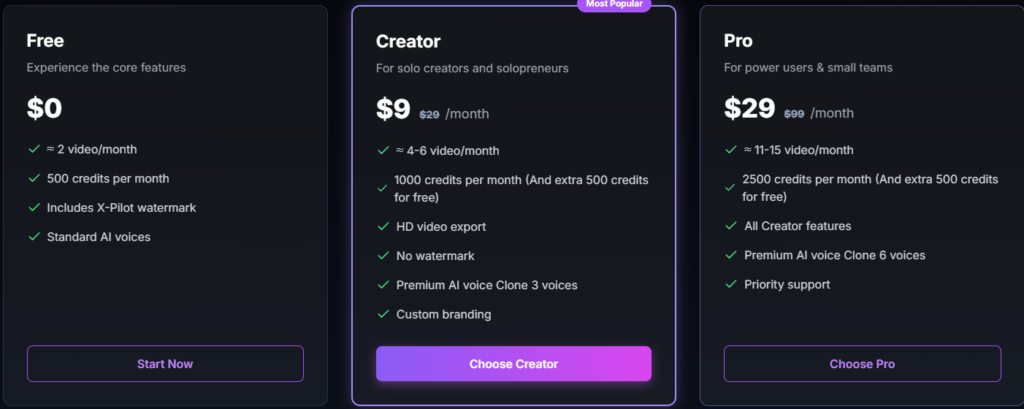
Plans & Pricing
How Can I Register On This X-Pilot AI Program?
Go to X-Pilot AI Website
Open any web browser and search for the X-Pilot AI website at: X-Pilot AI website
Hit Sign Up
Press the Sign Up or Get Started button that appears on the home page.
Fill in Your Info
In the registration page that appears, fill in the sections:
- Your complete name
- Your email
- A password of your making (should be strong)
- Optional: Name of your organization, or company
Accept the Terms of Service
Check the box for the Terms of Service and Privacy Policy and check both to indicate acceptance of the terms.
Email Verification
A confirmation email will be sent to your email address from X-Pilot AI. Open the email and click on the confirmation link.
Log In
Go back to X-Pilot AI’s website and log in using your email and the password you created
Profile Set Up (Recommended)
- Upload a picture to your profile
- Set your role
- Choose your preferences
- Set your preferences for AI video styles
- Set your preferences for content styles
Start Using X-Pilot AI
Upload your documents, PDFs, or presentations and choose a template or motion style.
Start creating your educational or explainer video.
Is X-Pilot AI Worth it?
Certainly, the X-Pilot AI model can be quite beneficial for users such as educators, course builders, trainers, knowledge workers etc., who would like to convert text, PDFs, slides, documents to educational videos with far less editing than what traditional video editing requires.
X-Pilot employs a knowledge visualization engine with logic driven motion graphics and intelligent editing to preserve production instructional clarity while reducing time. Many users appreciate this as compared to video creation tools manually.
On the flip side, it is also more specialized than most AI video makers. It is more focused on content, education and training. If your intention is to create more cinematic story telling and videos with a high degree of creativity, you can find better solutions than this.
Its time savings, structured output, and customization features stand out and make it a viable option for those who are focused on educational video production.
Turn PDFs & PPTs into Course Videos for Free
Convert PDF, PowerPoint, Markdown, text, scripts, or web pages into engaging course videos with knowledge visualization—no video editing skills needed. Perfect for Udemy instructors and independent educators.
PDF to AI Video
Turn documents into
engaging videos
PPT to AI Video
Convert slides to
narrated videos
Markdown to Video
Developer-friendly
video creation
Text to Video
Turn text into
course videos
Free Video Lesson Generator for Udemy & Educators
X-Pilot is a free AI Video Maker for Courses that transforms your PDFs, PPTs and Markdown into engaging course videos—no editing skills required. Perfect for Udemy instructors, independent educators, and content creators who want knowledge visualization in their videos.
Online Course Generator
Turn a syllabus or textbook into a complete structured video curriculum. Automatically generates chapters, quizzes, and learning paths.
Educational Video Generator
Create instructional videos that follow pedagogical logic. Perfect for flipping the classroom and blended learning environments.
Explainer Video Generator
Visualize abstract concepts and complex theories using AI motion graphics. Turn ‘hard-to-explain’ ideas into clear visual stories.
Micro-Lecture Generator
Generate vertical, fast-paced knowledge shorts for TikTok and YouTube Shorts. Capture student attention in under 60 seconds.
Why Udemy Instructors & Educators Choose X-Pilot for Course Videos
We’re not another “talking head” generator. X-Pilot is a free AI Video Maker for Courses with knowledge visualization—built for educators who want accuracy, not random clips.
Motion Graphics for Course Videos
10,000+ templates for educators
Transform complex concepts into crystal-clear visuals. Our motion graphics library turns abstract ideas into flowcharts, diagrams, and process visualizations—automatically.
Natural Language Editing
Instructional Video Maker Interface
Edit videos by typing what you want. No timeline manipulation required. Perfect for educators creating e-learning content—just tell AI “remove the intro” or “add emphasis at 2:30.”
Knowledge Fidelity
Video Curriculum Designer Accuracy
Zero AI hallucinations guaranteed. Our online course builder transforms PDFs & PowerPoints into educational videos with 100% fidelity to your source material. Every formula, concept, and teaching logic preserved.
Real Use Cases from Creators Like You
Online Course Creation
Transform lecture notes and textbooks into structured video curriculums with chapters, quizzes, and learning paths—no editing skills required.
Technical Documentation Videos
Convert complex code walkthroughs and API docs into clear visual tutorials with flowcharts, diagrams, and syntax highlighting.
Explainer Videos for Concepts
Visualize abstract ideas and theories using 100+ motion boxes—from quantum physics to blockchain, AI to economics.
Corporate L&D Training Videos
Scale employee onboarding, compliance, and skills training with consistent, branded professional videos across your organization.
How Does X-Pilot AI Work
Content Input – Users submit text, PDFs, slides, or write a prompt to explain what they want.
AI Understanding – The system breaks down the content to find the main ideas, steps, and the relationships among them.
Visual Structuring – Using motion templates, ideas are translated into structured visuals, such as diagrams, flowcharts, and timelines.
Script Generation – A script, designed to optimize learning, is generated to structure the flow of the video.
Voice & Style Selection – Users select preferences like colors, branding, voiceovers, and languages.
Video Generation – The system automatically creates an animated educational video.
Editing & Refinement – Users can make changes by giving commands in plain English.
Export & Share – Users can share or download the video for presentations, training, or courses.
Some Outstanding Features Offer By X-Pilot AI?
Text-to-Video
Converts written documents, text, presentations, etc. into fully animated videos.
Knowledge Visual Mapping
Converts Knowledge into flowcharts, diagrams, timelines, etc.
AI Script Generation
Provides clear and logical narration for the completion and enhancement of the learning flow of the Narration.
Motion Graphic Templates
Professionally animated video templates to enhance the video content, no designing needed.
Natural Language Video Editing
Simply describe the changes you want in text and the AI will edit your video to your specifications, (“add more details here”)
Voiceover in Several Languages
Multiple voices and languages to choose from for the voiceover
Branding
Upload your logo to the video, choose your company colors, and set your preferred style.
Sharply Focused
Reduces the chances of AI error to a minimum while retaining the structure and the content.
Video Formats
You are able to download your videos in multiple video formats for training, teaching, or presentations.
Speed
Compared to manual video editing, it is a remarkably fast process.
X-Pilot AI Pros Or Cons
| Pros | Cons |
|---|---|
| Converts text and documents into animated videos quickly | May be less suited for highly creative or cinematic video styles |
| Generates structured visuals like diagrams and flowcharts | Learning curve for users unfamiliar with AI video tools |
| Produces educational content with logical sequencing | Some advanced features may require a paid plan |
| Offers natural language editing for easy refinement | Limited customization compared with full video editing software |
| Supports multilingual voiceovers | Output quality depends on input quality and clarity |
| Helps save time over manual video production | May not handle highly abstract or subjective topics perfectly |
| Brand customization (logos, colors) | Templates might feel repetitive for frequent users |
| Reduces manual design effort with automated templates | Internet connection required for cloud-based processing |
Conclusion
For educators, trainers, and content producers who wish to quickly and easily convert written content into organized, visually appealing instructional films, X-Pilot AI stands out as a useful solution. It simplifies difficult subjects while preserving accuracy and clarity by fusing AI-driven concept analysis, motion-based visual templates, and natural language editing.
Its strengths are speed, consistency, and learning-focused design, even though it might not be able to fully replace creative video editors for cinematic projects. All things considered, X-Pilot AI is a useful tool for anyone looking to increase knowledge exchange, optimize training processes, and effectively offer expert instructional content.
FAQ
What is X-Pilot AI?
X-Pilot AI is an AI-powered platform that turns text, slides, and documents into structured educational videos with visuals and voiceovers.
Who is X-Pilot AI for?
It’s ideal for educators, trainers, course creators, and professionals who need to create instructional videos quickly.
How does X-Pilot AI work?
You upload content, the AI analyzes key ideas, maps them into visuals, generates a script, adds voiceovers, and produces an animated video.
Can I edit the videos?
Yes — you can refine videos using simple text commands or adjust styles, colors, and voice options.
What formats can I export?
Finished videos can be exported in common video formats like MP4.